
UX CASE STUDY
UX CASE STUDY
duration
duration
4 weeks
4 weeks
Project Type
Project Type
Personal Project
Personal Project
my role
my role
UX & UI Design
UX & UI Design
OVERVIEW
OVERVIEW
Clarity is a proactive subscription management application that centralizes recurring expenses and free trials into a single, intuitive dashboard. It empowers users to prevent surprise charges and identify wasteful spending through smart renewal alerts and usage analytics.
Clarity is a proactive subscription management application that centralizes recurring expenses and free trials into a single, intuitive dashboard. It empowers users to prevent surprise charges and identify wasteful spending through smart renewal alerts and usage analytics.
THE WHY
THE WHY
The rapid shift to subscription-based models throughout the world has led to subscription fatigue, where users lose track of scattered recurring payments across multiple platforms. There is a common frustration of paying for zombie subscriptions - services that are forgotten but continue to drain bank accounts unnoticed.
The rapid shift to subscription-based models throughout the world has led to subscription fatigue, where users lose track of scattered recurring payments across multiple platforms. There is a common frustration of paying for zombie subscriptions - services that are forgotten but continue to drain bank accounts unnoticed.
PROBLEM STATEMENT
PROBLEM STATEMENT
With recurring payments scattered across emails, credit cards, and app stores, users lack a unified view of their financial commitments. This fragmentation leads to subscription creep where users unknowingly pay for forgotten free trials, duplicate services, and unused memberships, resulting in significant annual financial waste and loss of control.
With recurring payments scattered across emails, credit cards, and app stores, users lack a unified view of their financial commitments. This fragmentation leads to subscription creep where users unknowingly pay for forgotten free trials, duplicate services, and unused memberships, resulting in significant annual financial waste and loss of control.
DESIGN PROCESS
DESIGN PROCESS
Empathize
Empathize
Define
Define
Ideate
Ideate
Design
Design
RESEARCH
RESEARCH
To build a foundation for Clarity, a mixed-method research approach was employed to understand both market dynamics and user behaviors. The process began with secondary research into the subscription economy and the behavioral psychology behind spending habits. This was followed by one-to-one user interviews to uncover deep-seated pain points, along with a competitive audit to identify where existing solutions were failing to protect users.
To build a foundation for Clarity, a mixed-method research approach was employed to understand both market dynamics and user behaviors. The process began with secondary research into the subscription economy and the behavioral psychology behind spending habits. This was followed by one-to-one user interviews to uncover deep-seated pain points, along with a competitive audit to identify where existing solutions were failing to protect users.
KEY QUESTIONS ASKED
KEY QUESTIONS ASKED
How do you currently keep track of all your monthly subscriptions?
Have you ever paid for a service you forgot to cancel after a free trial?
Do you know the exact total amount you spend on subscriptions every month?
What prevents you from cancelling a service you haven't used in a while?
How does an unexpected auto-debit notification make you feel?
How do you currently keep track of all your monthly subscriptions?
Have you ever paid for a service you forgot to cancel after a free trial?
Do you know the exact total amount you spend on subscriptions every month?
What prevents you from cancelling a service you haven't used in a while?
How does an unexpected auto-debit notification make you feel?
KEY OBSERVATIONS & INSIGHTS
KEY OBSERVATIONS & INSIGHTS
Most users rely on checking bank statements after money is deducted, rather than tracking it beforehand.
Most users rely on checking bank statements after money is deducted, rather than tracking it beforehand.
01
01
02
80% of participants admitted to forgetting to cancel a free trial at least once in the past year.
80% of participants admitted to forgetting to cancel a free trial at least once in the past year.
02
Users consistently underestimated their total monthly subscription spend by roughly 30%.
03
Users feel that finding the Unsubscribe button is intentionally difficult compared to the Sign Up process.
04
Users keep unused services (like streaming platforms) active due to FOMO, fearing they might need them someday.
05
Many users unknowingly pay for redundant services (e.g., having both Apple Music and Spotify Premium).
06
Generic bank SMS alerts are often ignored; users specifically want alerts before the renewal date, not after.
Generic bank SMS alerts are often ignored; users specifically want alerts before the renewal date, not after.
07
07
02
80% of participants admitted to forgetting to cancel a free trial at least once in the past year.
03
Users consistently underestimated their total monthly subscription spend by roughly 30%.
04
Users feel that finding the Unsubscribe button is intentionally difficult compared to the Sign Up process.
05
Users keep unused services (like streaming platforms) active due to FOMO, fearing they might need them someday.
06
Many users unknowingly pay for redundant services (e.g., having both Apple Music and Spotify Premium).
07
Generic bank SMS alerts are often ignored; users specifically want alerts before the renewal date, not after.
COMPETITIVE ANALYSIS
COMPETITIVE ANALYSIS


The Automated Aggregators (Rocket Money, Hiatus, Mint)
Pros: Strong on automation; Rocket Money excels at bill negotiation, while Hiatus offers targeted cancellation and Mint provides a holistic financial view.
Cons: Often suffer from "feature bloat" and clutter. They require sensitive bank credentials, raising privacy concerns, and primarily function as reactive trackers rather than proactive planners.
The Manual Trackers (Bobby)
The Manual Trackers (Bobby)
Pros: Extremely simple, clean UI that respects user privacy by not requiring bank linking.
Cons: Entirely dependent on manual user input. It lacks optimization insights (like identifying redundancy) and high-friction maintenance often leads to user abandonment.
Pros: Extremely simple, clean UI that respects user privacy by not requiring bank linking.
Cons: Entirely dependent on manual user input. It lacks optimization insights (like identifying redundancy) and high-friction maintenance often leads to user abandonment.
THE MARKET GAP
THE MARKET GAP
While aggregators offer automation and manual trackers offer simplicity, existing solutions largely function as reactive lists rather than proactive safeguards. The market lacks a tool dedicated to proactive risk management specifically, one that prioritizes timely intervention for expiring trials and upcoming renewals. Clarity bridges this gap by ensuring users are warned before charges occur, avoiding the complexity and clutter of general finance apps.
While aggregators offer automation and manual trackers offer simplicity, existing solutions largely function as reactive lists rather than proactive safeguards. The market lacks a tool dedicated to proactive risk management specifically, one that prioritizes timely intervention for expiring trials and upcoming renewals. Clarity bridges this gap by ensuring users are warned before charges occur, avoiding the complexity and clutter of general finance apps.
USER PERSONAS
USER PERSONAS


USER STORIES
USER STORIES
With the diverse behaviors of Aarav, Jessica, and Martha clearly defined, the focus shifted to bridging the gap between their qualitative pain points and concrete technical requirements. Their frustrations were synthesized into specific user stories, ensuring that every proposed feature from manual tracking to smart alerts was not merely a functional addition, but a direct solution to a verified user problem.
With the diverse behaviors of Aarav, Jessica, and Martha clearly defined, the focus shifted to bridging the gap between their qualitative pain points and concrete technical requirements. Their frustrations were synthesized into specific user stories, ensuring that every proposed feature from manual tracking to smart alerts was not merely a functional addition, but a direct solution to a verified user problem.
"As a security-conscious user, I want to manually add offline bills (like gym or newspaper) so I can track expenses without linking my bank account."
"As a security-conscious user, I want to manually add offline bills (like gym or newspaper) so I can track expenses without linking my bank account."
01
01
"As a user with shared living expenses, I want to split costs within the app so I don't have to awkwardly chase friends for money."
"As a user with shared living expenses, I want to split costs within the app so I don't have to awkwardly chase friends for money."
02
02
"As a household manager, I want to visualize spending categories so I can instantly spot and cancel redundant services."
"As a household manager, I want to visualize spending categories so I can instantly spot and cancel redundant services."
03
03
"As a subscriber, I want to receive alerts a few days before a trial ends so I never pay for a service I don't want."
"As a subscriber, I want to receive alerts a few days before a trial ends so I never pay for a service I don't want."
04
04
INFORMATION ARCHITECTURE
INFORMATION ARCHITECTURE

LO-FI WIREFRAMES
LO-FI WIREFRAMES


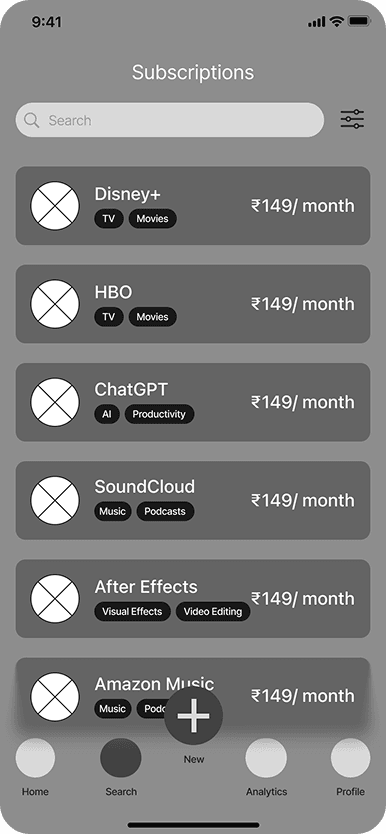


STYLE GUIDE
STYLE GUIDE
A modular design system was developed to focus on clarity and trust. A deep navy background was utilized to create a premium, distraction-free environment, accented by a primary blue that evokes stability, a standard cue in fintech. For typography, SF Pro was selected to leverage native iOS familiarity and minimize cognitive load, while soft, pill-shaped buttons were chosen to counter the rigidity of financial data, making the interface feel approachable and friendly rather than strict.
A modular design system was developed to focus on clarity and trust. A deep navy background was utilized to create a premium, distraction-free environment, accented by a primary blue that evokes stability, a standard cue in fintech. For typography, SF Pro was selected to leverage native iOS familiarity and minimize cognitive load, while soft, pill-shaped buttons were chosen to counter the rigidity of financial data, making the interface feel approachable and friendly rather than strict.
COLORS
COLORS
LOGO
LOGO
TYPE
TYPE
H1
AaBbCc
20pt-SF Pro
H2
AaBbCc
25pt-SF Pro
H3
AaBbCc
20pt-SF Pro
H4
AaBbCc
18pt-SF Pro
H5
AaBbCc
18pt-SF Pro
FEATURES
FEATURES
Subscription Splitting
Subscription Splitting
Easily allocate plan costs to friends or family within the app to ensure everyone pays their fair share of the group subscription.
Easily allocate plan costs to friends or family within the app to ensure everyone pays their fair share of the group subscription.

ANALYTICS HUB
ANALYTICS HUB
Provides a clear visualization of spending habits, low-usage, and overlapping services for immediate optimization.
Provides a clear visualization of spending habits, low-usage, and overlapping services for immediate optimization.

IN APP CHAT FEATURE
IN APP CHAT FEATURE
Facilitates simple, direct conversation with shared contacts about
logistics, reminders, and coordination.
Facilitates simple, direct conversation with shared contacts about subscription logistics, payment reminders, and cost coordination.

CUSTOM SUBSCRIPTIONS
CUSTOM SUBSCRIPTIONS
Allows users to securely and manually track any bill (e.g., gym class, magazine) without requiring bank account linking.
Allows users to securely and manually track any bill (e.g., gym class, magazine) without requiring bank account linking.

REMINDER HUB
REMINDER HUB
The central planning dashboard that consolidates all upcoming payments, trials, and custom due dates into one chronological list.
The central planning dashboard that consolidates all upcoming payments, trials, and custom due dates into one chronological list.

MAIN USER FLOWS
MAIN USER FLOWS
1. ONBOARDING
1. ONBOARDING
You start with a clean title screen allowing you to quickly log in or sign up. The secure entry process is designed to be hassle-free, getting you past the door in seconds.
You start with a clean title screen allowing you to quickly log in or sign up. The secure entry process is designed to be hassle-free, getting you past the door in seconds.

WELCOME SCREEN
WELCOME SCREEN

SIGN UP
SIGN UP
Next, you decide how to track your subscriptions, link your email for automatic detection or choose manual entry for privacy. This ensures the setup fits your comfort level immediately.
Next, you decide how to track your subscriptions, link your email for automatic detection or choose manual entry for privacy. This ensures the setup fits your comfort level immediately.

LINK SUBSCRIPTION SCREEN
LINK SUBSCRIPTION SCREEN
Finally, you land on your dashboard, instantly seeing your monthly spend and upcoming renewals. You can browse your subscriptions or check the payment calendar to see exactly when bills are due.
Finally, you land on your dashboard, instantly seeing your monthly spend and upcoming renewals. You can browse your subscriptions or check the payment calendar to see exactly when bills are due.

HOME SCREEN
HOME SCREEN
2. BUYING A SUBSCRIPTION
2. BUYING A SUBSCRIPTION
You start by discovering a new service via the home screen or a quick search.
You start by discovering a new service via the home screen or a quick search.

HOME SCREEN
HOME SCREEN

SEARCH SCREEN
SEARCH SCREEN
Finally, you breeze through the payment stage by entering your details and selecting your preferred method. A confirmation screen instantly pops up to seal the deal, letting you know your new subscription is secured and active.
Finally, you breeze through the payment stage by entering your details and selecting your preferred method. A confirmation screen instantly pops up to seal the deal, letting you know your new subscription is secured and active.

PAYMENT SCREEN
PAYMENT SCREEN

CONFIRMATION
SCREEN
CONFIRMATION
SCREEN
Once you select a subscription, you customize your plan choosing between private or shared usage and plans. You then get a clear snapshot in the cart, reviewing your product details and final bill before checkout.
Once you select a subscription, you customize your plan choosing between private or shared usage and plans. You then get a clear snapshot in the cart, reviewing your product details and final bill before checkout.

SUBSCRIPTION INFO
SUBSCRIPTION
INFO

CART SCREEN
CART SCREEN
3. CANCELLING A SUBSCRIPTION
3. CANCELLING A SUBSCRIPTION
You start by tapping the analytics icon in the navbar, which takes you to a dashboard highlighting low-usage or overlapping services. From here, you can instantly choose to cancel wasteful apps or modify plans to better fit your needs.
You start by tapping the analytics icon in the navbar, which takes you to a dashboard highlighting low-usage or overlapping services. From here, you can instantly choose to cancel wasteful apps or modify plans to better fit your needs.

ANALYTICS SCREEN
ANALYTICS SCREEN
If you choose to cancel, you’re rewarded with a confirmation screen that celebrates exactly how much money you’ve saved. If you opt to modify, you’re taken directly to the subscription page, where you can easily downgrade or switch plans without any friction.
If you choose to cancel, you’re rewarded with a confirmation screen that celebrates exactly how much money you’ve saved. If you opt to modify, you’re taken directly to the subscription page, where you can easily downgrade or switch plans without any friction.

CANCELLATION SCREEN
CANCELLATION
SCREEN

SUBSCRIPTION INFO
SUBSCRIPTION
INFO
4. CREATING A CUSTOM SUBSCRIPTION
4. CREATING A CUSTOM SUBSCRIPTION
You start by tapping the central plus button in the nav bar to access the custom subscription tool. Here, you can manually enter all the essential details giving you full control over offline bills or untracked expenses.
You start by tapping the central plus button in the nav bar to access the custom subscription tool. Here, you can manually enter all the essential details giving you full control over offline bills or untracked expenses.
HOME SCREEN
HOME SCREEN

CUSTOM
SUBSCRIPTION
CUSTOM
SUBSCRIPTION
Once you hit save, a friendly confirmation screen pops up to let you know your new manual tracker is set and ready.
Once you hit save, a friendly confirmation screen pops up to let you know your new manual tracker is set and ready.

CONFIRMATION SCREEN
CONFIRMATION SCREEN
OTHER SCREENS & FEATURES
OTHER SCREENS & FEATURES

CHAT SCREEN
CHAT SCREEN

REMINDER HUB
REMINDER HUB

PROFILE SCREEN
PROFILE SCREEN
CONCLUSION & LEARNINGS
CONCLUSION & LEARNINGS
Designing Clarity was more than just a UI exercise; it was a deep dive into the psychology of financial anxiety. The project challenged me to move beyond simple tracking features and instead focus on behavioral change helping users shift from reactive stress to proactive control. While the initial goal was to automate everything, user research revealed that people feel vulnerable when apps take over their finances.
Designing Clarity was more than just a UI exercise; it was a deep dive into the psychology of financial anxiety. The project challenged me to move beyond simple tracking features and instead focus on behavioral change helping users shift from reactive stress to proactive control. While the initial goal was to automate everything, user research revealed that people feel vulnerable when apps take over their finances.
WHAT WENT WELL
WHAT WENT WELL
One of the biggest wins was successfully designing a dual-path onboarding system. By allowing users to choose between automated linking and manual entry, I ensured the app remained accessible to privacy-conscious users without sacrificing the efficiency needed by power users.
The Analytics Hub proved that data visualization is a powerful tool for persuasion. By grouping subscriptions into categories and flagging overlaps, the design didn't just show data it effectively argued for better financial habits.
One of the biggest wins was successfully designing a dual-path onboarding system. By allowing users to choose between automated linking and manual entry, I ensured the app remained accessible to privacy-conscious users without sacrificing the efficiency needed by power users.
The Analytics Hub proved that data visualization is a powerful tool for persuasion. By grouping subscriptions into categories and flagging overlaps, the design didn't just show data it effectively argued for better financial habits.
CHALLENGES & GROWTH
CHALLENGES & GROWTH
I initially assumed users wanted a completely frictionless experience. However, testing revealed that when money is involved, too much speed feels reckless. I learned that adding intentional friction like confirmation steps for payments or cancellations actually increased user trust and reduced errors.
I underestimated the complexity of non-standard subscriptions. Building the Custom Subscription flow taught me the importance of flexibility in form design, ensuring the system didn't break when faced with real-world messiness.
I initially assumed users wanted a completely frictionless experience. However, testing revealed that when money is involved, too much speed feels reckless. I learned that adding intentional friction like confirmation steps for payments or cancellations actually increased user trust and reduced errors.
I underestimated the complexity of non-standard subscriptions. Building the Custom Subscription flow taught me the importance of flexibility in form design, ensuring the system didn't break when faced with real-world messiness.
Table Of Contents